hiroaki
Individual Developer
View all authors

Optimize Costs by Automatically Deleting Old Docker Images in Artifact Registry

· 4 min read
hiroaki
Individual Developer

Tackling Rising Storage Costs in Artifact Registry

When using a CI/CD pipeline with tools like GitHub Actions to deploy to Google Cloud Run, a new Docker image is pushed to Artifact Registry with every run. While this is a very convenient system, old images will pile up if left unchecked. Have you ever been surprised by a higher-than-expected storage bill?

This article introduces how to solve this problem using Artifact Registry's "Cleanup Policies" feature. I'll provide a step-by-step guide on how to automatically delete unnecessary old Docker images to continuously optimize your storage costs.

This guide is based on the Google Cloud Console UI as of July 2025.

Browser Memo Feature: A Log of URL Sharing and UX Improvements

· 4 min read
hiroaki
Individual Developer

Browser Memo Feature: A Log of URL Sharing and UI/UX Improvements

Introduction

Regarding the previously implemented Browser Memo feature.

Based on user experience and analysis of competing services, I have implemented significant feature enhancements.

This article outlines the key technical points of implementing a URL-based memo sharing feature and the UI/UX improvements made in the process.

Related:

How to Enable Key Repeat on Mac by Disabling the Accent Menu

· 3 min read
hiroaki
Individual Developer

Restore Comfortable Typing on Your Mac

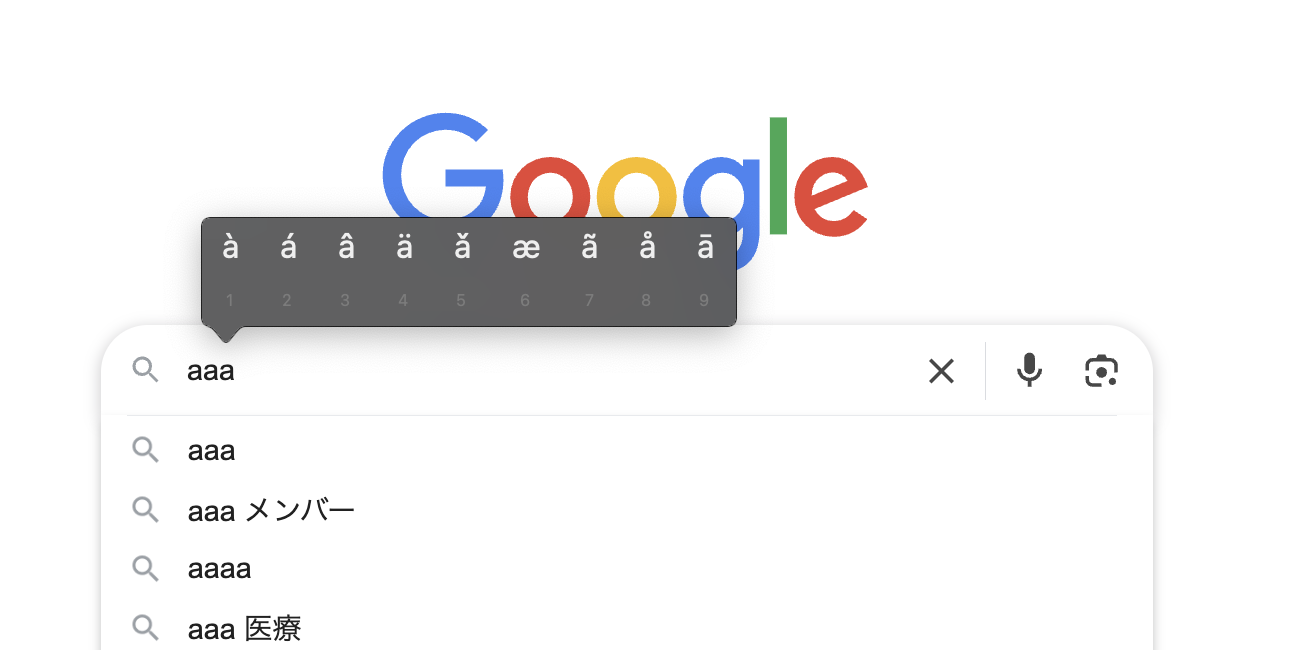
When you're writing or coding on your Mac, have you ever held down a key like a, expecting it to repeat like aaaaa..., only to be interrupted by a menu of accented characters (like à)?

Accent Menu

This is a handy macOS feature called "Press and Hold," but it can hinder your workflow, especially when you need to type the same character repeatedly for coding or writing.

This article provides a clear, step-by-step guide on how to disable this accent menu and enable traditional key repeat, even for those unfamiliar with macOS.

This guide has been tested on the following environment:

  • Mac: M1, 2020
  • macOS: Sonoma 15.1 (24B83)

How to Optimize Algolia Search by Language on a Docusaurus Multi-language Site

· 6 min read
hiroaki
Individual Developer

When implementing Algolia DocSearch on a multi-language (i18n) site built with Docusaurus, I faced the challenge of search results containing mixed languages. It's common for situations to arise that harm the user experience, such as English pages appearing in search results when searching in Japanese.

This article organizes the specific setup steps as a technical memo to solve this problem and achieve an optimal search experience that syncs with the site's display language.

What you can achieve with this article
  • Filter search results to match the site's display language (Japanese/English).
  • Automatically route content to language-specific Algolia indexes based on the URL path (/ or /en/).
  • Improve search accuracy with index settings tailored to the characteristics of each language, such as Japanese and English.

How to Internationalize the Docusaurus Navbar and Footer

· 3 min read
hiroaki
Individual Developer

This post is a memo organizing the process of internationalizing (i18n) the main UI components of a Docusaurus site: the navbar and footer.

1. Purpose

The Docusaurus i18n feature is a mechanism for making site text multi-lingual. This time, I'll explain the process of adding new items to the navbar and footer and translating them from Japanese (the default) to English.

Procedure for Implementing Multi-language (i18n) Support on a Docusaurus Site

· 5 min read
hiroaki
Individual Developer

This article organizes the steps I took to implement multi-language support (i18n) on a Docusaurus site, enabling content switching between Japanese (default) and English.

Based on the official documentation, this guide also includes practical tips for real-world scenarios, such as commands for a Docker environment and reliable methods for verifying functionality before deployment.

Prerequisites:

  • Site Generator: Docusaurus (project already set up)
  • Development Environment: Docker (local environment commands are also provided)
  • Goal: To support two languages: Japanese (ja) and English (en)

A Log of Solving Routing and Deployment Issues with Docusaurus i18n

· 5 min read
hiroaki
Individual Developer

This article is a record of the journey from identifying to resolving two tricky problems I encountered when adding internationalization (i18n) to a site built with Docusaurus v3: "client-side routing collapse" and "container startup failure on Cloud Run."

Prerequisites:

  • Site Generator: Docusaurus v3
  • Hosting: Google Cloud Run
  • Development & Deployment: Docker, GitHub Actions
  • Package Manager: pnpm

A Record of Implementing an In-Site Browser Memo Feature in Docusaurus

· 5 min read
hiroaki
Individual Developer

This article organizes the main specifications and technical points from when I implemented a simple, client-side browser memo feature on a Docusaurus site using React and TypeScript.

1. Basic Features and Purpose

To provide a feature that allows users to easily create and save text memos in their browser, with the content persisting on subsequent visits. The focus is on ease of use and responsiveness by having everything run entirely on the client-side (using the browser's localStorage) without any server-side processing.

Editing Docusaurus Navigation Icons: Three Approaches

· 5 min read
hiroaki
Individual Developer

This article outlines three main patterns for displaying icons or specific symbols in the navigation bar of a Docusaurus site.

1. Displaying with Text and Symbols

This is the most direct and simple method for displaying icons or symbols in navigation items. It is achieved by writing directly into the label property within the Docusaurus configuration file.