Pulling X Ads Numbers via API Requires an Application — A Look at the Ads API Access Form

I run small paid campaigns on X (formerly Twitter) for a service I operate on my own, and I had been copying the numbers out of the Ads Manager UI by hand every time. Looking into pulling them via API instead, I found that the X Ads API is a separate, approval-gated program from the regular X API, and using it requires an application. I had assumed API keys were enough, so this caught me off guard.
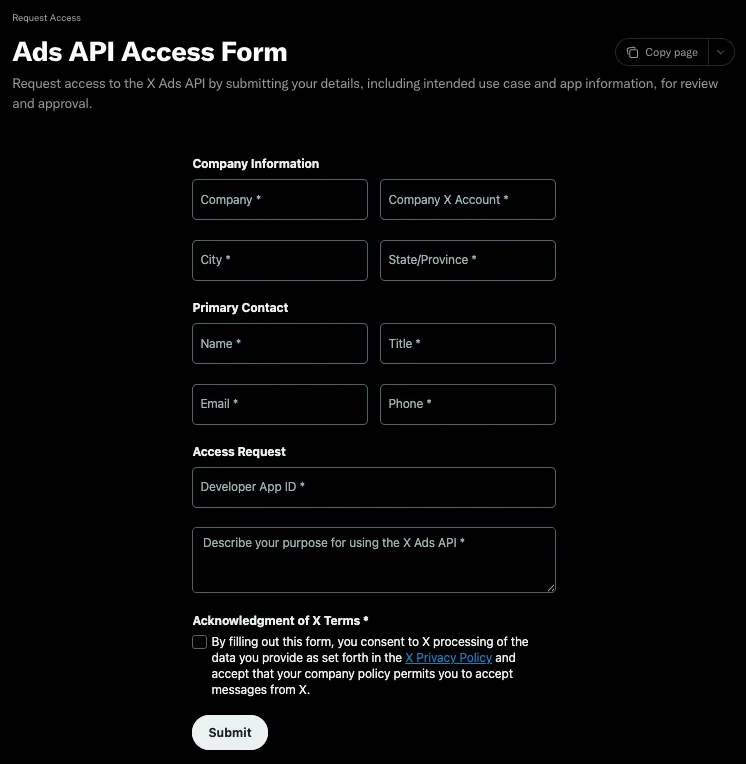
The form is behind a login, and you cannot tell what it asks for ahead of time. Here is the screen as of September 2026, along with what I put in each field.
A Different System From the Regular X API
The endpoints that serve advertising numbers live on a different host: the regular X API is api.x.com, while the Ads API is ads-api.x.com.
On top of that, it is approved per app, and requests from an unapproved app do not go through. Having a developer account does not grant it, and neither does paying for API usage. So "I have valid keys but keep getting 403" can mean nothing is misconfigured — you just have not applied.
Applying is free, and so is using the Ads API. The only thing you pay for is the ad spend itself.
The Form's Fields
It is a single page with about ten inputs, all required.
| Block | Field | What I entered |
|---|---|---|
| Company Information | Company | Service name with (individual developer) appended |
| Company X Account | The handle running the ads | |
| City / State-Province | Where I am based. There is no country field | |
| Primary Contact | Name / Email / Phone | Something I can be reached at |
| Title | Owner / Developer (the field assumes a company; rather than blank or N/A) | |
| Access Request | Developer App ID | Taken from the developer portal URL (below) |
| Describe your purpose | Free-text use case (below) | |
| Acknowledgment of X Terms | Consent checkbox | — |
What surprised me is that there is no field for choosing an access level. No dropdown, no radio button — the only place to state it is the free-text box. There is likewise no field for the endpoints you plan to use or your expected call volume. In practice, the only things a reviewer sees are your App ID and one textarea.
The App ID Is in the URL
The developer portal does not label it as an ID anywhere on the page, but it appears at the end of the URL when you open the app.
https://console.x.com/accounts/0000000000000000000/apps/00000000
                               ~~~~~~~~~~~~~~~~~~~      ~~~~~~~~
                               developer account ID     ← this is the App ID
There is another long number right after /accounts/, but that is the ID of the developer account itself and is not what the form wants. The digit counts differ enough to tell them apart, though it is easy to copy the wrong one.
What I Wrote in the Purpose Field
Since everything that matters gets funneled here, I covered:
- The access level I was requesting (no dedicated field, so it goes in the text)
- What the service is and what kind of ads I run
- Which data I want to pull and what I use it for
- That this covers my own advertising account only
- Expected call volume and frequency
There are two access levels, Conversion Only and Standard Access. Confusingly, you need Standard Access even just to read performance numbers: the Analytics endpoints that return impressions and clicks are not part of Conversion Only, so "I am only reading, so I will ask for the lighter one" is not an option.
Two things I kept in mind. First, be explicit that this covers only my own account and is read-only — what reviewers watch for is handling third-party advertiser accounts and redistributing the data, so I ruled both out up front. Second, state the volume concretely and small. Describing the shape of the operation, like "once a day" and "fewer than 100 calls a month," shows the access level is proportionate to the actual usage.
Requesting Standard Access while writing that read-only is sufficient looks contradictory, so I added a line noting that Analytics only exists under Standard.
Submitting gives you a Success! screen. That is not approval — the decision arrives by email.
One more thing: there are several reports that the form link from the official documentation renders blank or redirects to a "no longer accepting" page. The documented fallback is to open a thread in the Ads API Access category of the developer community forum (devcommunity.x.com). The form opened fine for me, so I did not need it.
What Approval Gets You
The approval email arrived the same day I applied — far faster than expected, with essentially no waiting.
What it unlocked is getting the numbers you were reading in the Ads Manager UI as data instead.
- The advertising accounts you can access, and their IDs
- The structure — campaigns, ad groups, and the ads currently running
- Performance numbers — impressions, clicks, spend, engagements, video completion rates, and so on
- Daily breakdowns (the last 7 days immediately, and up to 90 days via asynchronous jobs)
That removes the loop of opening a screen, reading numbers off it, and retyping them. With only a handful of campaigns you can do it by hand, but doing it every day is another matter — and the bigger win was automating the downstream work too, like joining the data against purchase records to compute acquisition cost.
Three things approval does not change. Rate limits are never raised (though at individual-usage scale you are unlikely to hit the ceiling). Spend takes up to three days to finalize, lagging behind impressions and similar metrics that settle within 24 hours. And authentication requires 3-legged OAuth 1.0a — the bearer tokens commonly used with v2 are not accepted.
Summary
If you want X advertising data via API, you need a separate Ads API application on top of the regular X API. Not knowing this means burning time suspecting your configuration.
The form itself is about ten fields and nothing to brace for, but two things will trip you up if you do not know them in advance: there is no field for the access level, so it has to go in the free-text box, and reading performance data alone still requires Standard Access. The App ID, the easiest part to get stuck on, is visible at the end of the developer portal URL.
References
- X Ads API - Getting Started — The official entry point covering the Ads API and how it relates to the regular X API.
- Increasing access — The official page describing access levels and the application process.
- Analytics — Definitions of the available metrics, retrievable time ranges, and rate limits.
- X Developer Community — The forum that serves as the fallback application route when the form does not work.