hiroaki
Individual Developer
View all authors

Implementing Share Buttons in Docusaurus: A Log and Troubleshooting Guide

· 6 min read
hiroaki
Individual Developer

Implementing the Share Buttons

I've added share buttons to each article on this site for social media sharing. This post documents the implementation process and the technical decisions behind it.

A key feature of the final component is its ability to automatically fetch the page title and URL. This means that once it's set up, there's no need for special configurations on a per-article basis, which minimizes maintenance.

This article is a record from when it was written. For the continuously maintained procedure, see the technical documentation version.

Creating a Multilingual News Links Page in Docusaurus

· 5 min read
hiroaki
Individual Developer

This article outlines the key considerations and technical details involved in implementing a "News Page" on a Docusaurus site, designed to list domestic and international news sources.

This article is a record from when it was written. For the continuously maintained procedure, see the technical documentation version.

1. Page Purpose and Key Features

The primary goal was to build a personal information hub for quick access to reliable news sources. The page is built as a static site, emphasizing fast performance, usability, and maintainability.

Optimize Costs by Automatically Deleting Old Docker Images in Artifact Registry

· 4 min read
hiroaki
Individual Developer

Tackling Rising Storage Costs in Artifact Registry

When using a CI/CD pipeline with tools like GitHub Actions to deploy to Google Cloud Run, a new Docker image is pushed to Artifact Registry with every run. While this is a very convenient system, old images will pile up if left unchecked. Have you ever been surprised by a higher-than-expected storage bill?

This article introduces how to solve this problem using Artifact Registry's "Cleanup Policies" feature. I'll provide a step-by-step guide on how to automatically delete unnecessary old Docker images to continuously optimize your storage costs.

This guide is based on the Google Cloud Console UI as of July 2025.

Browser Memo Feature: A Log of URL Sharing and UX Improvements

· 4 min read
hiroaki
Individual Developer

Browser Memo Feature: A Log of URL Sharing and UI/UX Improvements

Introduction

Regarding the previously implemented Browser Memo feature.

Based on user experience and analysis of competing services, I have implemented significant feature enhancements.

This article outlines the key technical points of implementing a URL-based memo sharing feature and the UI/UX improvements made in the process.

This article is a record from when it was written. For the continuously maintained procedure, see the technical documentation version.

Related:

How to Enable Key Repeat on Mac by Disabling the Accent Menu

· 4 min read
hiroaki
Individual Developer

Restore Comfortable Typing on Your Mac

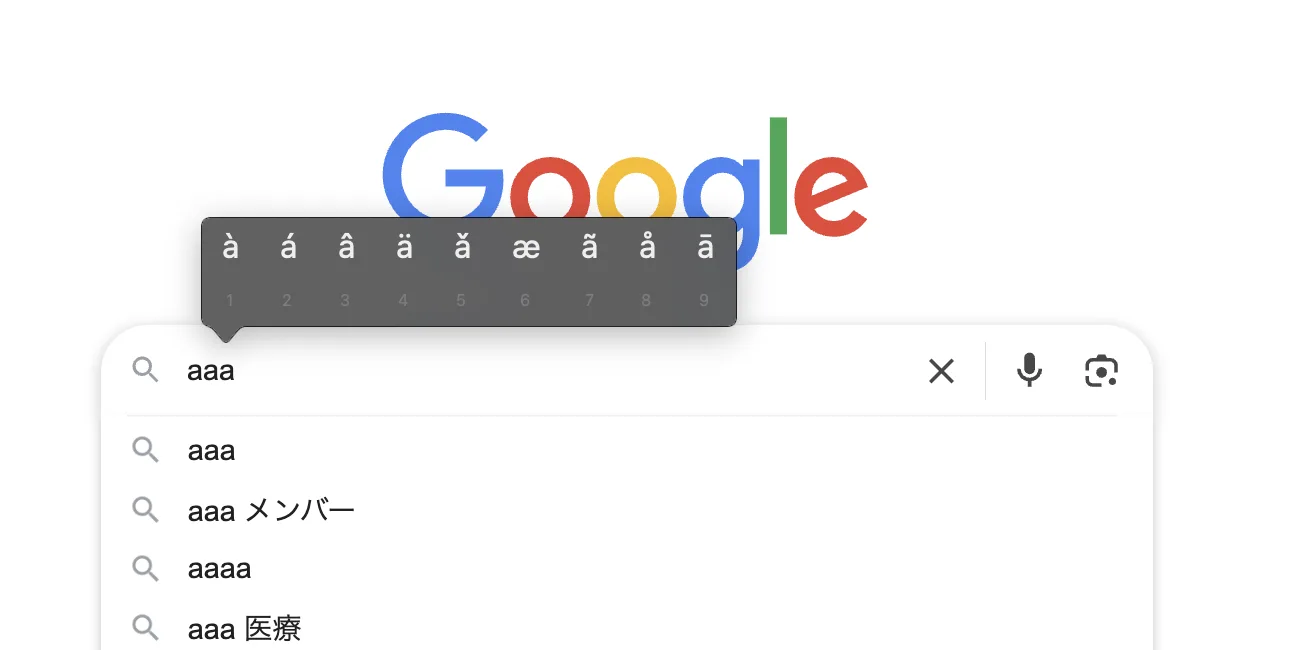
When you're writing or coding on your Mac, have you ever held down a key like a, expecting it to repeat like aaaaa..., only to be interrupted by a menu of accented characters (like à)?

Accent Menu

This is a handy macOS feature called "Press and Hold," but it can hinder your workflow, especially when you need to type the same character repeatedly for coding or writing.

This article provides a clear, step-by-step guide on how to disable this accent menu and enable traditional key repeat, even for those unfamiliar with macOS.

More Mac articles: Fixing custom wallpaper issues · Reclaiming 109GB of disk space · Fixing public Wi-Fi captive portals

This guide has been tested on the following environment:

  • Mac: M1, 2020
  • macOS: Sonoma 15.1 (24B83)

How to Optimize Algolia Search by Language on a Docusaurus Multi-language Site

· 7 min read
hiroaki
Individual Developer

When implementing Algolia DocSearch on a multi-language (i18n) site built with Docusaurus, I faced the challenge of search results containing mixed languages. It's common for situations to arise that harm the user experience, such as English pages appearing in search results when searching in Japanese.

This article is a record from when it was written. For the continuously maintained procedure, see the technical documentation version.

This article organizes the specific setup steps as a technical memo to solve this problem and achieve an optimal search experience that syncs with the site's display language.

Update (2026-07): An important correction to this approach

This article's claim that contextualSearch builds the index name (yoursite_ja / yoursite_en) from the current locale was incorrect. In reality, contextualSearch never changes indexName; it queries a single index and narrows results at query time with facetFilters such as language:<locale>. This site has since been consolidated into a single-index setup. See the update note in the technical documentation version for details.

What you can achieve with this article
  • Filter search results to match the site's display language (Japanese/English).
  • Automatically route content to language-specific Algolia indexes based on the URL path (/ or /en/).
  • Improve search accuracy with index settings tailored to the characteristics of each language, such as Japanese and English.

Integrating Google Analytics (GA4) with Docusaurus

· 4 min read
hiroaki
Individual Developer

This post outlines the setup procedure for integrating Google Analytics 4 (GA4) into our Docusaurus site for traffic analysis, serving as a technical memo.

This article is a record from when it was written. For the continuously maintained procedure, see the technical documentation version.

Features:

  • Integrate Google Analytics 4 (GA4) with a Docusaurus site.
  • Enable site-wide traffic analysis.

How to Internationalize the Docusaurus Navbar and Footer

· 4 min read
hiroaki
Individual Developer

This post is a memo organizing the process of internationalizing (i18n) the main UI components of a Docusaurus site: the navbar and footer.

For the basic i18n setup, see Procedure for Implementing Multi-language (i18n) Support on a Docusaurus Site.

Note that this article is a record from when it was written. For the continuously maintained procedure, see the technical documentation version.

1. Purpose

The Docusaurus i18n feature is a mechanism for making site text multi-lingual. This time, I'll explain the process of adding new items to the navbar and footer and translating them from Japanese (the default) to English.

Procedure for Implementing Multi-language (i18n) Support on a Docusaurus Site

· 6 min read
hiroaki
Individual Developer

This article organizes the steps I took to implement multi-language support (i18n) on a Docusaurus site, enabling content switching between Japanese (default) and English.

Based on the official documentation, this guide also includes practical tips for real-world scenarios, such as commands for a Docker environment and reliable methods for verifying functionality before deployment.

See also the record of solving the routing and deployment issues that arose afterward, and the procedure for internationalizing the navbar and footer.

Note that this article is a record from when it was written. For the continuously maintained procedure, see the technical documentation version.

Prerequisites:

  • Site Generator: Docusaurus (project already set up)
  • Development Environment: Docker (local environment commands are also provided)
  • Goal: To support two languages: Japanese (ja) and English (en)

A Log of Solving Routing and Deployment Issues with Docusaurus i18n

· 5 min read
hiroaki
Individual Developer

This article is a record of the journey from identifying to resolving two tricky problems I encountered when adding internationalization (i18n) to a site built with Docusaurus v3: "client-side routing collapse" and "container startup failure on Cloud Run."

The basic i18n setup steps are covered in Procedure for Implementing Multi-language (i18n) Support on a Docusaurus Site.

Note that this article is a record from when it was written. For the continuously maintained procedure, see the technical documentation version.

Prerequisites:

  • Site Generator: Docusaurus v3
  • Hosting: Google Cloud Run
  • Development & Deployment: Docker, GitHub Actions
  • Package Manager: pnpm